Applied for UPSC 2026 but realized something went wrong? Don’t panic, but DO act fast. The Union Public Service Commission has provided a 7-day correction window for the Civil Services (IAS) and Indian Forest Service (IFS) Pre Examination 2026. This is the final opportunity to rectify errors that could otherwise lead to the rejection of your candidature.
UPSC 2026 Correction Window Last Date and Time: The Final Call
The UPSC 2026 Correction Window Date officially ends today, March 03, 2026. Thousands of aspirants are accessing the portal right now, so it is highly recommended to finish your edits before 06:00 PM. History shows that the UPSC servers tend to slow down or even crash during the last 2 hours because of heavy traffic.
🛑 Mandatory: The New Photo Rule!
For UPSC 2026, many students are making a common mistake. Your photograph must strictly follow these rules, otherwise, your form will be rejected even if you clear the exam:
- Name & Date: Your name and the date on which the photo was taken must be printed at the bottom of the photo.
- Age of Photo: The photo should not be older than 10 days from the start of the application.
- Face Clearance: Your face (without spectacles/hats usually) should occupy 3/4th of the space.
- Dimensions: Minimum 350×350 pixels (Maximum 1000×1000).
- File Size: Between 20 KB to 300 KB (JPG Format).
Sample UPSC 2026 Photo (Guide)
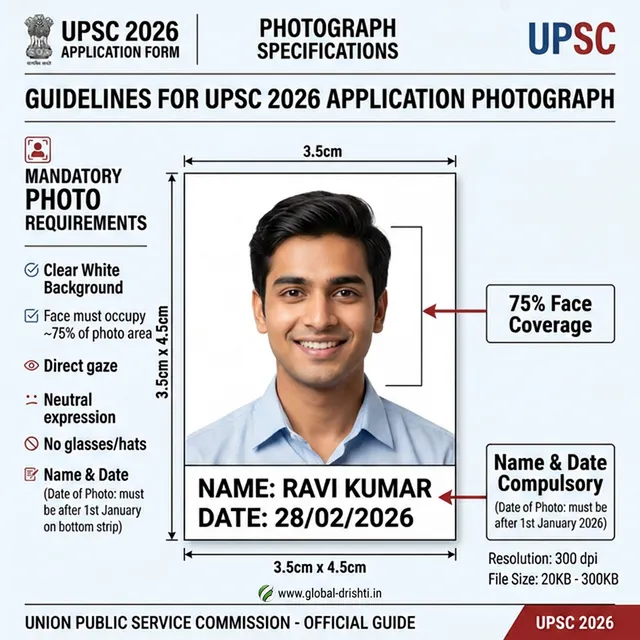
(Sample: Note the white strip with Name and Date at the bottom)
How to Edit UPSC IAS IFS 2026 Application Form (Step-by-Step)
Based on the latest user data and official instructions, here is the foolproof way to modify your form. You basically have two parts to handle: OTR (One Time Registration) and the Exam Application itself.
- Step 1: OTR Login – Go to upsconline.nic.in. Enter your Email ID/Mobile and the OTP.
- Step 2: Check OTR Details – If you made a mistake in your Name, Father’s Name, or Date of Birth, click on ‘Modification in OTR’. Important: You can only modify OTR once in your lifetime!
- Step 3: Modify Application – On the dashboard, find the tab ‘Latest Notification’. Here you will see a link: “Click here for modification in application form”.
- Step 4: Part 1 & Part 2 Correction – You can now edit your Education details, Category, Exam Center choice, and your Photograph/Signature uploads.
- Step 5: Preview Every Page – Don’t rush! Click on the ‘Preview’ button after every change. Ensure the new photo is visible and clearly displays your name and today’s date (or photo date).
- Step 6: Final Submission – Click on ‘Final Submit’. A system-generated OTP will be sent to confirm. Once submitted, download the updated Application PDF for your records.
❗ Important Things to Remember
- ⚠️ Single Modification: Most candidate fields can only be edited ONCE during this 7-day window. Take your time!
- ⚠️ Center Allotment: If you change your Exam Center, remember it follows the “First Apply First Allot” rule. If a center is full, you can’t pick it.
- ⚠️ Fee Status: If you change your category from SC/ST to OBC/General, you must pay the ₹100 fee online immediately to complete the edit.
- ⚠️ No Offline Requests: UPSC will NOT accept any hard copies or emails for technical corrections after 6:00 PM today.
Vacancy & Post Summary
Let’s remind ourselves what’s at stake. This recruitment covers some of the most prestigious roles in India:
| Post Name | Total Vacancies | Eligibility |
|---|---|---|
| Indian Administrative Service (IAS) | 933 | Any Bachelor Degree |
| Indian Forest Service (IFS) | 80 | Bachelor Degree (Science Background) |
| Total Combined | 1013 | – |
UPSC 2026 Correction Window (FAQ)
Q: When is the absolute last time to edit the form?
A: The deadline for **UPSC 2026 Correction Window Last Date and Time** is March 03, 2026, 6:00 PM IST.
Q: Can I change my photo multiple times?
A: You can edit during the window, but once you click “Final Submit,” you cannot edit again. Do it right the first time.
Q: What if I lose my OTR Password?
A: Use the “Forgot Password” link on the OTR portal. You can reset it using your registered Mobile No or Email ID.
Global Drishti Disclaimer: We aim to provide accurate recruitment information. However, please verify all details on the official UPSC portal (upsc.gov.in) before making any final submission. We are not liable for any technical errors or rejection of candidature.

Expert content writer at Global Drishti, dedicated to providing accurate and timely updates on Sarkari Naukri, Government Schemes, and Political Trends. Trusted by students and job aspirants.